Skip to content

After-School Activity Attendance Management System

Teachers and coaches mark attendance on a phone or with the pupil's card, while the municipality sees groups, timetables and attendance across all schools and sports centres in one place.

Pupil lists come from the Register of Pupils, and inspectors can check a session on site.
View features
  • Works in the browser and on the phone
  • On-site checks by inspectors
  • Marking by phone or pupil card
  • Connection to the Register of Pupils

What changes

  • Without the system: Attendance is recorded on paper or in Excel spreadsheets.
    With the system: The teacher marks attendance on the phone during the session.
  • Without the system: The municipality collects data from each school separately.
    With the system: Data from all schools in one place, in real time.
  • Without the system: There is no way to check whether a session actually took place.
    With the system: The location and time of marking are saved, and inspectors check on site.
  • Without the system: Timetable changes are agreed by phone and e-mail.
    With the system: Changes are submitted and approved in the system.

Features

Attendance register

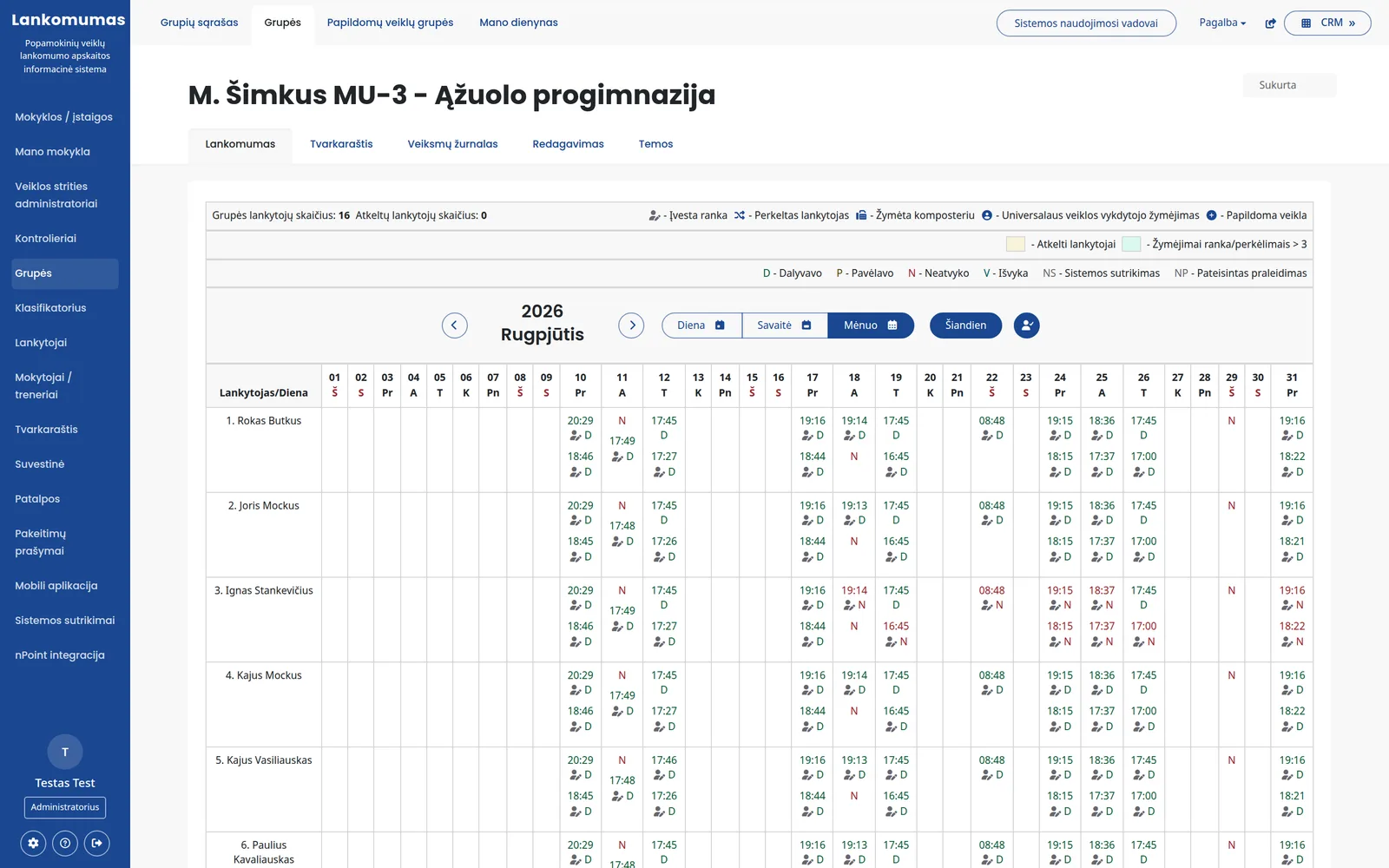
Each group's attendance is shown in a day, week or month view.

  • Marks: present, late, absent, trip and excused absence
  • Marked by phone, by pupil card at a reader or by hand, and you can see how it was marked
  • The exact time is saved with each mark
  • Children attending another group's session are marked separately
  • The register can be printed

Groups and attendees

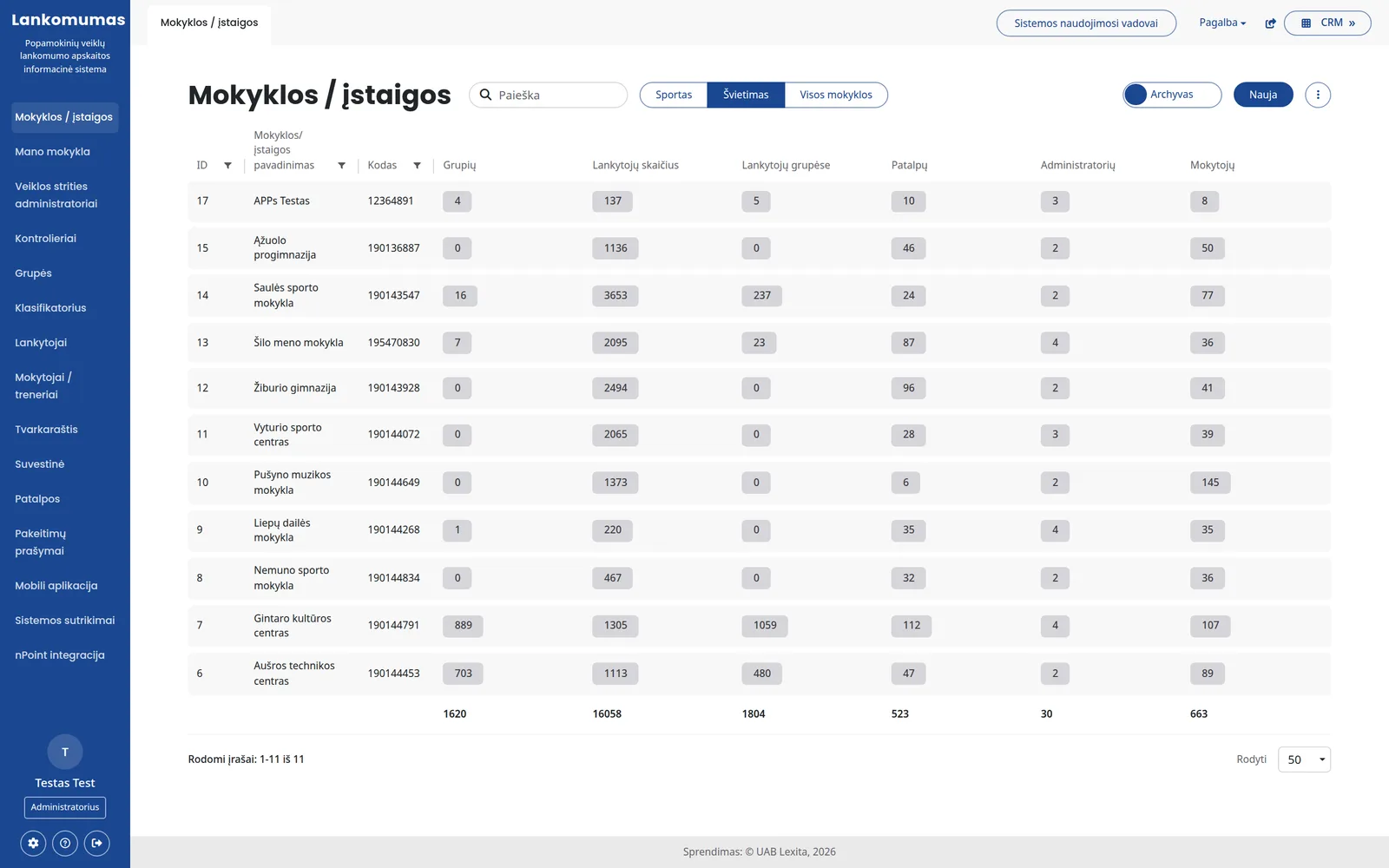
All groups of the city's schools and sports centres in one place.

  • Groups are organised by area of activity and discipline, with numbers of groups and attendees
  • Each group has a teacher, room, maximum size and timetable
  • Children's lists are updated from the Register of Pupils
  • An attendee can be moved to another group, and the history is kept
  • Separate groups and session topics for extra activities

Timetable and changes

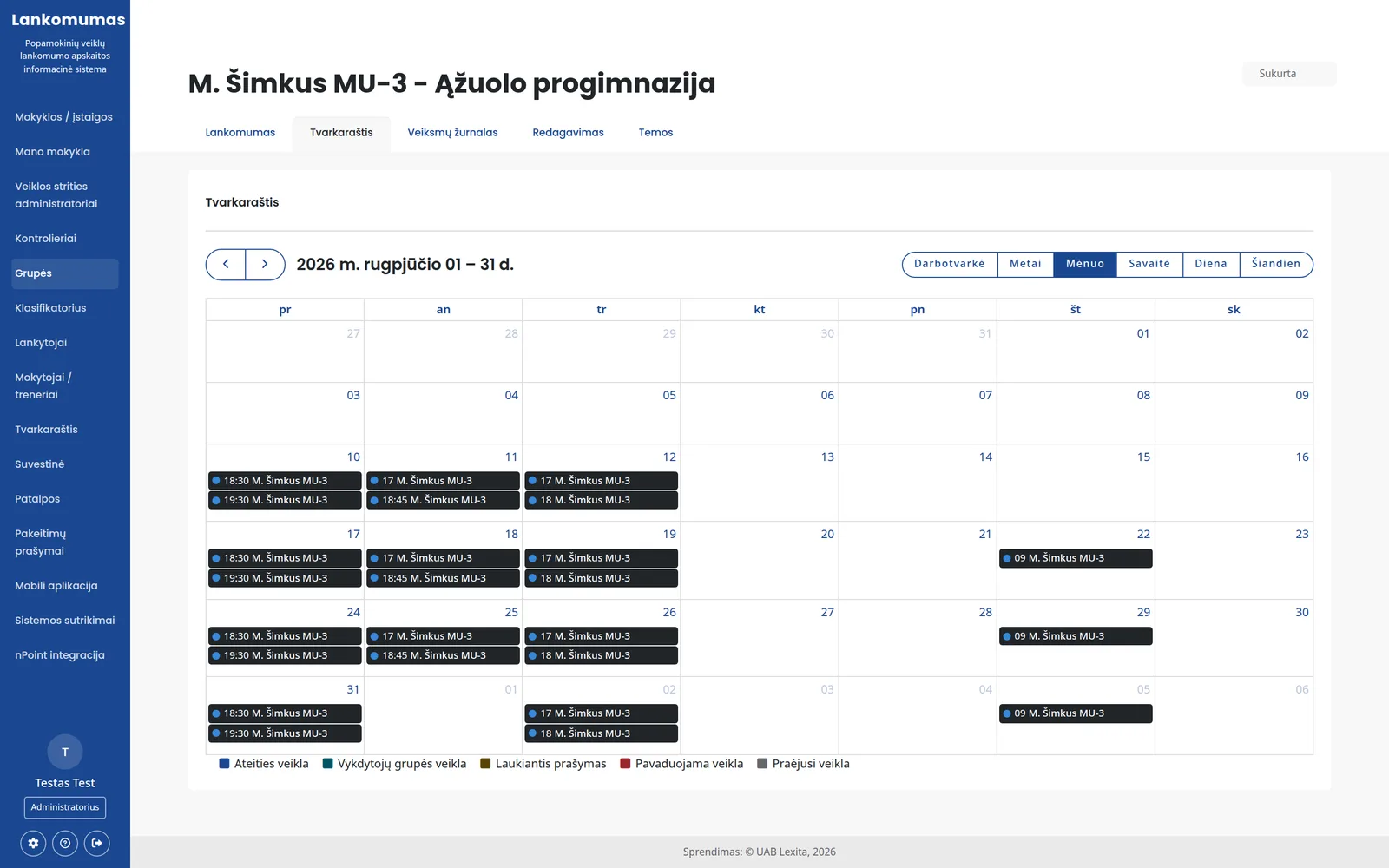
Sessions are planned by group, teacher and room.

  • Day, week, month, year and agenda views
  • Timetable for the whole municipality, a school or a single group
  • The teacher submits a request to cancel or move a session or assign a substitute
  • Approved changes appear immediately in the timetable and the register

On-site checks

Municipal inspectors check whether a session is actually taking place.

  • The inspector marks attendees at the session on their own phone
  • Their marking is compared with the teacher's: how many attended and how many were absent
  • You can see how many marks were entered by hand and how many have GPS data
  • List of inspections with filters by period

Reports

Reports are generated from the same register data, without manual entry.

  • By teacher and by group, full and short
  • Attendance and session topic reports for a single group
  • The period and institution are chosen before generating
  • School summary: groups, attendees, rooms and teachers

Other modules

mobile app

For teachers, coaches and inspectors.

  • Attendance is marked during the session
  • The location is saved with the marking
  • New versions are distributed through the system

Card readers

The child marks their own arrival.

  • Pupil card at a reader in the hall or at the door (card reader)
  • The mark goes into the register automatically
  • List of readers and last connection

Change requests

Timetable changes without phone calls.

  • Cancellation, rescheduling, substitution
  • Request archive and summary
  • Once approved, the change appears in the timetable

Rooms and spaces

Where each session takes place.

  • Own premises and those of other institutions
  • Addresses for session venues
  • A room is assigned to a group

Sports centre turnstiles

Passing through a turnstile becomes a mark.

  • Groups and timetables are sent to the turnstile system
  • Passages come back as attendance marks
  • No need to mark twice

Activity log

Every change is kept in the history.

  • Who changed what in a group and when
  • Details of every action
  • Separate permissions for each role

Who it is for

  • For the municipality

    Attendance, timetables and reports for all institutions in one place.

  • For a school or institution

    Its own groups, teachers, rooms and change requests.

  • For a teacher or coach

    Class register and attendance marking on the phone.

  • For inspectors

    On-site checks and comparison with the teacher's marking.

Integrations

Population Register

Personal data is verified in the register.

Card by phone

The pupil card is scanned with the teacher's phone.

Location detection

The marking location is saved for institutions that have this enabled.

Frequently asked questions

Didn't find an answer? Write or call us - we'll be happy to help.

No. They mark attendance on the phone, in the mobile app, during the session.

The time is saved with each mark, and for institutions that have it enabled, the location too. Inspectors can also check the session on site.

Yes. Where card readers or turnstiles are installed, arrival is marked with the pupil card.

Children's data is taken from the Register of Pupils, and schools assign them to groups.

Yes. We configure activity areas, classifiers, roles and reports to match your procedures.

We will show you the system with your schools

In a short demo we will show the register, the timetable and the reports, and discuss what needs to be adapted.

+370 657 58414