Skip to content

Complaint and Claim Management System

An online system for receiving, handling and administering complaints, claims, notifications and requests. Applicants contact you through a portal and can see how their case progresses. The institution or company registers each request in one place, assigns the responsible specialist, tracks deadlines, prepares letters and decisions and checks how they are carried out.

Statuses, deadlines, request types and document templates are configured to your needs.
View features
  • Runs in the browser
  • Lithuanian product
  • Login via the e-Government Gateway
  • Integration with DBSIS and other document systems

Enquiries should not get lost in email

The system brings the applicant, the handling specialist, the party complained about and document management together in one process - from submission to implementation of the decision.

Registration

Now Complaints arrive by email, by post and through the registry office, so some of them are registered late.
With the system The enquiry is submitted via the portal or picked up automatically from the document management system and receives a number immediately.

Updates

Now The applicant calls to ask how the handling of their complaint is progressing.
With the system In the portal, they can see the status, the assigned specialist and the institution's letters themselves, and correspond within the same case.

Deadlines

Now Handling deadlines are counted on a calendar, and delays come to light too late.
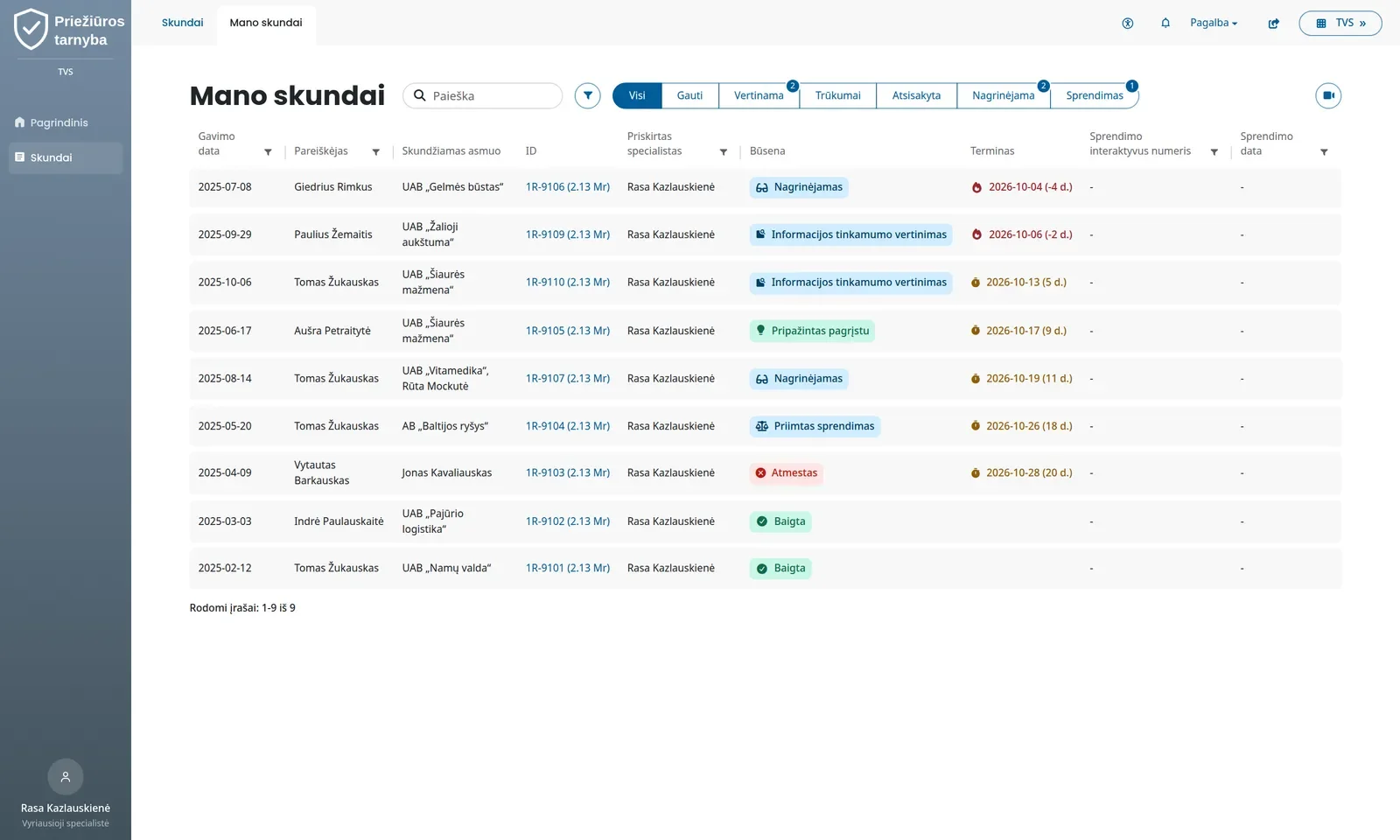
With the system Once an enquiry is submitted, a full set of deadlines is created, and the list is sorted by the nearest deadline: “3 days left”, “2 days overdue”.

Party complained about

Now When a complaint is forwarded to the party complained about, the applicant's details are hidden manually.
With the system The specialist marks which parts of the complaint and which files to disclose, and the party, using an access code, sees only those.

Authorisations

Now A representative's authorisation is checked against a copy sent in.
With the system Notarial authorisations and those in the Register of Authorisations are verified automatically in the state register.

Statistics

Now Annual statistics are compiled from Excel spreadsheets, and nobody knows where a figure came from.
With the system The report is generated with one click, and clicking any figure opens the records behind it.

The entire enquiry journey in one system

From submission in the portal to implementation of the decision, every stage is visible and remains in the case history.

Applicant portal

A single window for residents and organisations: no separate registration, passwords or paper forms.

  • Sign-in via the e-Government Gateway: with online banking, Smart-ID, mobile signature or an ID card
  • On first sign-in, an account is created automatically, and the full name or company name is taken from the gateway
  • On the home page - submitted enquiries, latest status changes and quick actions
  • Accessible to people with disabilities (WCAG)
  • Lithuanian and English, mobile-friendly

Form wizards

The enquiry is completed step by step, so the institution receives comprehensive information rather than a free-form letter.

  1. Applicant
  2. Person complained about
  3. Subject of the complaint
  4. Requirements
  5. Documents
  • Multiple applicants and multiple persons complained about, plus the option to select “unknown”
  • Legal hints in the form with links to legal provisions
  • The draft is saved, and on returning, you continue where you left off
  • Before submission - a review of the whole form with the option to correct each part
  • On submission, a PDF document is generated automatically and a unique number is assigned
  • Documents, photos, emails, signed documents, audio and video recordings can be attached

Representation and authorisations

A representative's right to act on behalf of another person is verified in the state register, not against a copy of the authorisation sent in.

  • Before each enquiry, the applicant chooses: “For myself” or “For another person”
  • A notarial authorisation is verified in the state register, and its PDF is attached to the case
  • An authorisation from the Register of Authorisations is checked against the service and is valid only until it expires
  • For any other basis of representation, a supporting document is uploaded
  • The organisation itself grants access to employees or other companies for all work or for specific areas

Case handling

The entire case on one card: the specialist does not need to search for material in folders and mailboxes.

  • Summary on the side: number, status, dates, responsible specialists, source and status timeline
  • Tabs: content, process and documents, deadlines, related cases, correspondence, history, enforcement measures
  • Related cases are grouped, and documents from the document management system are linked automatically
  • Internal comments that the applicant cannot see
  • The entire case can be downloaded as a single document
  • Documents, photos and recordings can be viewed instantly, without downloading anything

Statuses and deadlines

The status flow follows the legal procedure, and deadlines are calculated automatically.

  1. Received
  2. Admissibility assessment
  3. Case review
  4. Solution
  5. Compliance monitoring
  • The administrator sets the permitted next statuses, the colour and the name shown to the applicant
  • When changing a status, the system asks for the required data: grounds, dates, the deadline for remedying deficiencies
  • A case can be split into parts with different decisions, and an incorrect status can be rolled back
  • A set of deadlines based on your legislation, with working days calculated taking public holidays into account

Allocation and workload

Every case has a responsible specialist, and the manager sees how much each person is handling.

  • Several responsible specialists from different departments, for example legal and IT
  • Assignment manually based on the system's suggestion, or automatically based on the task assignee in the document management system
  • The suggestion lists available specialists first, starting with those who were assigned a case longest ago, along with their number of open cases
  • “Busy until” label and cover by a deputy for a set period
  • A personal dashboard of widgets that can be added, moved and resized
  • Department workload tables and a view of colleagues' dashboards for the manager

Documents and letters

Letters and decisions are prepared in the system from templates and go straight into the case and the document management system.

  • Decisions and letters are generated from templates, with case data filled in automatically
  • The generated document can be edited in Word directly from the system
  • The finished document is automatically registered in the case and in the document management system
  • For each document, you set whether external parties can see it, and an anonymised copy can be shown instead of the original

Involving the party complained about

The person complained about receives only what the specialist has decided to disclose.

  1. Selection
  2. Preview
  3. Access code
  4. Correspondence
  • Information disclosure wizard: the specialist ticks the parts of the complaint and the attachments
  • Before involving the party, you can choose what information it will be given
  • The party enters the access code in the portal and sees only the selected information
  • Secure correspondence with the responsible specialist, with all correspondence kept in the case

Statistics and reports

Reports are calculated from the same data that specialists enter as they work, so they are always up to date.

  • Indicators, charts and tables in one place
  • Clicking any figure, column or cell opens the exact list of records
  • At the turn of the year, cases are neither lost nor counted twice
  • An annual or quarterly report is prepared with one click, in Word or Excel format

All of the institution's supervisory activities

Not just complaints: notifications, enforcement of decisions, consultations, inspections and other activities are handled in the same system.

Assessment of notifications and applications

Mandatory notifications and applications are assessed in a structured way.

  • Each field is assessed as “Acceptable” or “Not acceptable”, and the question to the notifier is selected from a reference list
  • The notifier corrects only the unacceptable fields, and once they are corrected, a new assessment begins
  • All assessment versions are saved and cannot be changed
  • The assessment report and letter are generated based on the recommendation

Decisions and appeals

The system tracks the case up to the final court decision.

  • Enforcement measures: fine, offence report, order, recommendation, warning, reprimand and others
  • For a fine - the amount, payment deadline, whether it has been paid, whether it has been appealed
  • Appeal stages from registration to the appellate decision
  • If a court annuls a decision, a linked copy of the case is created for re-examination

Monitoring compliance with orders

A decision is not the end once it is adopted - the system tracks whether it has been implemented.

  • An order is broken down into items with deadlines
  • Evidence of compliance is collected for each item
  • In the list - “X days left” or “X days overdue” and the number of outstanding items
  • The most frequently recurring orders are flagged automatically

Consultations and knowledge bases

A recurring question always gets the same answer.

  • Questions submitted via the portal and consultations given by phone, email or in person
  • The answer is sent by email with a generated document
  • Consultation knowledge base: legal act, reason for the question, approved answer
  • Prior consultation requests with a separate workflow

Inspections, audits and monitoring

Planned supervision is handled in the same system as enquiries.

  • Inspections with an order, the inspected party, assignees and decisions
  • Multi-year audit plan, stages and automatically created tasks
  • The monitoring status changes according to the decision adopted
  • Tracking implementation of recommendations, with significance levels and deadlines

Activity registers instead of Excel

Other activities are recorded consistently, so they are easy to count at the end of the year.

  • Meetings, events and public information
  • International activities and representation in working groups
  • Methodological documents: guidelines, recommendations, memos
  • Coordination of draft legislation and law-making

Enquiry lifecycle

An enquiry follows a clear path from submission to implementation of the decision, and every action remains in the case history.

  1. Submission

    Portal wizard or document management system, authorisation check.

  2. Registration

    Number, PDF, set of deadlines, responsible specialists, notification to the applicant.

  3. Evaluation

    Admissibility, remedying deficiencies, additional information.

  4. Case review

    Correspondence, explanations from the party complained about, letters from templates.

  5. Solution

    Outcome, enforcement measures, registration in the document management system.

  6. Implementation and appeals

    Monitoring of orders, court decisions, statistics.

What the system can handle

Each enquiry type has its own form, statuses, deadlines and reports. We include the types agreed with you in the implementation, and others can be added later.

Complaints and claims

Applicant, person complained about, demands, amicable settlement

Incident and breach notifications

Structured form, assessment of each field, clarification cycle

Consultations

Via the portal and other channels, with a knowledge base

Prior consultation requests

Assessment, suspension, decision

Applications and permits

Accreditation, certification criteria, versioned assessment

Register of responsible persons

Organisations report appointed persons and any changes to them

Inspections, audits, monitoring

Plan, progress, results, recommendations

Orders

Items, deadlines, evidence of compliance

Integrations

The system does not work in isolation: enquiries come in from wherever they arise, and decisions go wherever they are needed.

Centre of Registers

A representative's authorisation is verified immediately, without paper copies.

Microsoft 365

Staff sign in with their work account and edit documents in the Word they already use.

Other systems

If needed, we also connect other systems you use.

Security and compliance

Enquiries contain a lot of personal data, so everyone sees only what is intended for them, and every action is recorded in the case history.

Record-level access

Permissions are set per role for each module: view, create, edit, delete, export. A specialist sees only the cases assigned to them, an applicant - only their own.

Sign-in protection

Microsoft accounts or a password with two-factor authentication. After failed attempts, sign-in is temporarily blocked.

Personal data protection

Anonymised copies are shown externally, and the party complained about, using an access code, sees only the information intended for it.

Implementation

We tailor the system to your procedures and legislation. Integrations are assessed separately: their duration and cost depend on which systems need to be connected.

  1. Procedure review

    Together we draw up a list of enquiry types, statuses, deadlines and approval sequences, as well as the required integrations.

  2. Configuration

    We configure the forms, statuses, deadlines, document templates and classifiers.

  3. Users and training

    We set up user roles and train your team.

  4. Support and development

    Support, updates and new modules as new needs arise.

Frequently asked questions

Didn't find an answer? Write or call us - we'll be happy to help.

No. They sign in via the e-Government Gateway, and an account is created automatically on first sign-in.

Yes. Statuses, their order and the names shown to the applicant are changed by the administrator. We configure deadline sets and document templates according to your procedure.

The specialist marks which parts of the complaint and which documents to disclose, or uploads an anonymised copy. The party receives an access code and sees only that in the portal.

The connection with DBSIS is already in place: enquiries arrive in the system and letters go back. We connect other systems as needed.

They are marked as unavailable, and no new cases are assigned to them. Cover by a deputy is set for a period, so the covering colleague continues the work without any switching.

Yes. We assess the scope of migration once we see how the data is currently stored and what history you want to keep.

We'll show you the system with your process

In a short remote demo, we will show how the system would handle your complaints, notifications and requests, and answer your questions.

+370 657 58414